Sunday, February 12, 2012

birthday bash cards!

On Saturday night, my upline and friend Andrea and I co-hosted a Birthday Bash Card Making Night that was held at my home. Both of us have birthdays in February and we thought it would be fun to hold an event to help celebrate with what we love to do...card making!! All of our guests made 8 cards for only $15 (2 each of 4 designs). I designed two and Andrea designed two. We wanted to showcase products from the Mini Occasions Catalog and Sale-A-Bration products, so our cards mainly highlighted those products. We also had an ice cream bar with lots of toppings! It was a great turn out of 14 stampers. We prepared for just a few more, so I have a handful of cards to make, but I love having a chance to do more stamping!

My first card was inspired by a sketch from a blog I recently found called Freshly Made Sketches. The designers encourage clean-lined creations with lots of "white space" and clean edges, but also encourages lots of details and embellishments, avoiding distressing and torn edges. Yippee...my kind of cards!!

This is the sketch...


And, my take on the sketch...


Stamp Set: Friendly Phrases, Mouthwatering (available in clear or wood mount)
Paper: Whisper White, Calypso Coral, Old Olive, Sweet Shop Specialty DSP
Ink: markers - Lucky Limeade, Calypso Coral
Accessories: Lucky Limeade Baker's Twine, Calypso Coral Baker's Twine, Stampin' Dimensionals, Mini Glue Dots (for Baker's Twine bow), Rhinestones Jewel Accents
Tools: Big Shot, Stripes Textured Embossing Folder, Dotted Scallop Ribbon Border punch


* * * * * * * * * * * * * * * * * * * * * * * * * * * * * * * * *

This second card was inspired by a card I saw here. I just changed up a few things, but loved the design layout and mostly the colors!!! Adding the butterflies with the pearls was a fun little accent.


Stamp Set: Outlined Occasions (SAB product!)
Paper: Very Vanilla, Calypso Coral, Pool Party, Poppy Parade, Lucky Limeade (polka dots), Everyday Enchantment DSP (SAB product!)
Ink: Early Espresso (inking edges), Black Stazon, markers - Lucky Limeade, Calypso Coral, Pool Party
Accessories: Pearls Jewel Accents, Stampin' Dimensionals
Tools: Big Shot, Beautiful Wings Embosslits Die, Scallop Trim Border punch


* * * * * * * * * * * * * * * * * * * * * * * * * * * * * * * * *

These are Andrea's cards she brought to the party...aren't they adorable??


Wednesday, February 8, 2012

sweets for the sweet & big top birthday

I was blessed with a couple days away last weekend (thanks, Sarah!). I was going to bring scrapbooking because I rarely get the chance to pull it out, but after looking through the pictures on the computer I got too overwhelmed and decided I would bring my card stuff instead. I really went into the weekend as a chance to relax, enjoy myself, and put no pressure on the amount I was going to get done. On my last craft weekend in the Fall, I spent too much of the weekend trying to be in work-work-work mode and didn't enjoy just being away. This time was different and I had more fun!!

I decided to make four cards of each design. My intention was to come away with as many cards as I could just to have on hand...I am always needing cards either to use myself or people are interested in buying. To make it easier, I tried to grab a couple packs of DSP and then any coordinating colors, stamp sets, etc. that went with it.

Here are a few of the cards I made using the Big Top DSP and Sweets for the Sweet stamp set...

With this first card, I was inspired by something I saw in the 2011-2012 Idea Book & Catalog.


Stamp Set: Sweets for the Sweet (available in clear or wood mount), Petite Pairs (sentiment-available in clear or wood mount)
Paper: Whisper White, Tempting Turquoise, Peach Parfait, Big Top DSP
Ink: markers - Peach Parfait, Poppy Parade, Daffodil Delight, Early Espresso
Accessories: 1/2"" Poppy Parade Taffeta ribbon, Rhinestones Jewel Accents, Stampin' Dimensionals
Tools: 1" Circle punch, Itty Bitty Shapes punch pack (smallest circle), Perfect Polka Dots Embossing Folder, Big Shot


* * * * * * * * * * * * * * * * * * * * * * * * * * *

I fell in love with Melissa Stout's "sweet" card (found here) and knew it was a great layout. I changed the sentiment and used Dazzling Diamonds Glitter instead of Dazzling Details, but just couldn't resist those cute lollipops!


Stamp Set: Friendly Phrases, Sweets for the Sweet (available in clear or wood mount)
Paper: Real Red, Whisper White, Big Top DSP
Ink: Real Red, Daffodil Delight, Old Olive
Accessories: 5/8" Real Red Satin ribbon, Dazzling Diamonds Glitter, Stampin' Dimensionals
Tools: 1" Circle punch


* * * * * * * * * * * * * * * * * * * * * * * * * * *

This one was a little more of a process as I cut out each of the three pinwheels using my Paper Snips.

Stamp Set: On Your Birthday (let's celebrate!)
Paper: Tempting Turquoise, Real Red, Daffodil Delight, Big Top DSP
Ink: Real Red, Tempting Turrquoise
Accessories: 1/8" Daffodil Delight Taffeta ribbon, 1/2" Real Red Taffeta ribbon (retired), sponges, Tempting Turquoise brads, Stampin' Dimensionals
Tools: Large Oval punch, Paper Snips, Dotted Scallop Ribbon Border punch, 1-1/4" Circle punch, 1" Circle punch


More cards to come!!

Monday, February 6, 2012

sending a kiss

Just one more week left until Valentine's Day...
have you been making some fun little treats lately?

{Hershey Kisses baggies I made for a relative to hand out to her grandkids}

Thursday, February 2, 2012

card making night - valentine's day style!

Every other month I travel to my mother-in-law's house house (about a 45 minute drive) and I hold a 3 for $6 card night there with her and her friends. We've been doing this just a little over a year now. Everyone seems to have a great time and it has worked really well into my schedule of having one more event I can count on to create cards! The turn out has always been really good, but last week there were 21 ladies, which was awesome!! This time around we decided to make all Valentine's Day cards. What fun!

The first card I designed using the sketch from The Paper Players.


Card #1
It's difficult to see but the Bashful Blue background has polka dots using the Backgrounds 1 Texturz Plate created with the Big Shot.

Stamp Set: Send Me Soaring (available in wood & clear mount), Teeny Tiny Wishes (sentiment)
Paper: Whisper White, Real Red, Bashful Blue, Marina Mist
Ink: Bashful Blue (clouds & inked edges), Chocolate Chip, Real Red, Red Glimmer Paper
Accessories: Sponges, 1/4" Real Red Grosgrain ribbon, Stampin' Dimensionals
Tools: Pinking Hearts Border punch, 1" Circle punch, 1-1/4" Circle punch, Owl punch (for extra small hearts on the bottom), Word Window punch


* * * * * * * * * * * * * * * * * * * * * * * * *

Card #2

Stamp Set: I {Heart} Hearts, Delightful Dozen
Paper: Whisper White, Cherry Cobbler
Ink: Cherry Cobbler
Accessories: Pearl Accents, Stampin' Dimensionals
Tools: Heart to Heart punch, Small Heart punch, Adorning Accents Textured Impressions Embossing Folder


* * * * * * * * * * * * * * * * * * * * * * * * *

Card #3
I wanted to use some different colors out of the normal Valentine's Day red and pink, so with the third card I used the beautiful Sweet Shop Specialty Paper in the Occasions Mini Catalog!

I added some Dazzling Diamonds glitter to the words to give it a little extra sparkle.
Stamp Set: Outlined Occasions (Sale-A-Bration)
Paper: Whisper White, Pool Party, Wisteria Wonder, Lucky Limeade, Sweet Shop Specialty Paper
Ink: Black Staz-On, markers - Pool Party, Lucky Limeade, Wisteria Wonder
Accessories: Dazzling Diamonds glitter, 3/8" Wisteria Wonder Ruffled ribbon, Rhinestone Accents, Stampin' Dimensionals
Tools: Fashionable Hearts Embosslits Die, Labels Collection Framelits Die,

My Digital Studio Express 30 Day Trial - download at anytime!

Stampin' Up! has begun offering a 30-day FREE trial of My Digital Studio Express. For those of you who have always thought about starting digital scrapbooking, this is a great opportunity!!

Here are some FAQs for those of you interested:

Q: How long can we take advantage of the My Digital Studio Express trial?
A: This is an ongoing offer. We want all our demonstrators and customers to be able to try My Digital Studio.

Q: What digital content comes with the My Digital Studio Express Trial?
A: My Digital Studio Express includes one stamp brush set, 12 Designer Series Paper patterns, 81 embellishments, 26 punches, and 5 designer templates. You can view a list of the included content here.

Q: What's the difference between My Digital Studio and My Digital Studio Express?
A: My Digital Studio Express is My Digital Studio software that you can download directly to your computer without having to wait for discs to be shipped to you. The program functionality is exactly the same as the disc version of the software with less digital content. You can watch a quick video explaining the difference between My Digital Studio and My Digital Studio Express here.

Q: Can I get the My Digital Studio Express Trial on a disc?
A: No. The My Digital Studio Express Trial is only available as a download over the Internet. However, the file is not large, so even if you have a dial-up internet connection, you will still be able to download the program.

Q: What are the system requirements to use My Digital Studio?
A: You can see the system requirements for My Digital Studio here.

Q: How do I order the My Digital Studio Express Trial?
A: You can purchase My Digital Studio Express Trial by visiting my online store and ordering HERE. You can order the free trial by itself, or you can add it to an order with stamping supplies or digital downloads. If the My Digital Studio Express Trial is the only item you order, you will not be asked for any credit card or payment information. If you are new customers to my online store, you will need to create an account.

Q: How do I install the My Digital Studio Express Trial software after you have ordered it?
A: You can access your My Digital Studio Express Trial download through the Downloads section of your account. Make sure you select Mac or Windows, and the download and install wizards will walk you through the rest of the process.


Q: Is the trial version of the software different from the paid version of My Digital Studio Express?
A: No. When you order the My Digital Studio Express Trial, you will receive the full version of My Digital Studio Express. The software will function exactly the same as if you had purchased the software--you can design, purchase downloads, and print. The only difference is that you can only use the trial version for 30 days.

Q: Can I place a print order with the trial version?
A: Yes. You have full access to everything you can do in My Digital Studio for a full 30 days. This includes full designing functionality, printing, and the ability to purchase downloads.

Q: Do my 30 days start as soon as I download My Digital Studio?
A: Your 30 day trial period starts as soon as you launch the program. It does not matter when you download the program, your 30 days will start as soon as you actually launch (open) the program.

Q: Will the trial still last 30 days even if I order it in the middle or end of the month?
A: You can order the My Digital Studio Trial at any time. The trial period is not tied to the calendar. The trial period will begin as soon as you launch the program, and you will be able to use it for the next 30 days.

Q: What happens after the 30 day trial period is over?
A: When you launch the software after the 30 day trial period is over, you will be prompted to enter a product key. You will not be able to use the software again until you have entered a product key. You can get a product key by purchasing My Digital Studio or My Digital Studio Express. The product key prompt will include a link to the software page of MyDigitalStudio.net, which will tell your customers where to order the software.

Q: How do I purchase My Digital Studio after the trial period is over?
A: Simply add My Digital Studio (item 118108) or My Digital Studio Express (item 124483) to your next order. If you order My Digital Studio Express, you will not need to reinstall the software. A product key will be e-mailed to you; after you complete your purchase, just enter that product key when the program prompts you to. If you purchase the disc version of My Digital Studio, you will need to use the installation discs in order to access the included digital content. The installation wizard will walk you through the process, including entering the product key (which you'll receive with your shipped discs). You will not lose any downloads or projects from your 30-day trial period.

Q: What happens to digital downloads I purchase during the 30 day trial period?
A: You (and your customers) will have continued access to any downloads you purchase during the trial period. If you choose to purchase the software, you will simply need to enter a product key, and you will be able to use all your downloads like normal. If you do not purchase the software, you will still have access to your downloads through your download manager, and you will be able to load them to the digital design software of your choice.

Q: Can I use My Digital Studio digital downloads in other design programs?
A: Yes. The My Digital Studio digital downloads will work with any digital design program.

Q: Will my saved projects be lost when the free trial ends?
A: You will not be able to edit any of your projects through My Digital Studio after the trial period has ended unless you purchase the software. If you do chose to purchase the software, you will be able to access all your projects. If you don't choose to purchase the software, we recommend you save your projects as jpg files. You will then be able to use them like you use any of your jpg (picture) files.

Q: Can I have two free trials?
A: No. The My Digital Studio Express Trial will only work once. After your 30 days are over, you need to purchase the software to continue using the program.

Q: What if I don't want to purchase the software at the end of the trial period?
A: You can uninstall the software at any time.

Q: Are there other free My Digital Studio downloads available?
A: We do occasionally offer free My Digital Studio downloads. These are generally promotions that run for a short amount of time, and will be announced in a current update. Download some of our free digital downloads for the 2010 In Color Card Stock and Designer Series Papers. You can find links to those downloads here.

Q: Will My Digital Studio work on my iPad?
A: No. We do not have a My Digital Studio app at this time.

Q: How do I use My Digital Studio?
A: We have several videos and resources available for both you and your customers on the training section of MyDigitalStudio.net that will help you learn how to use the program.

* * * * * * * * * * * * * * * * * * * * * * * * * * *

My Digital Studio is new to me, too! I haven't yet tried it out, but I'm excited to take advantage of this opportunity and glad that Stampin' Up! is offering customers to try it out for free, too! If you're interested in taking advantage of this, simply visit my online store to order!

Wednesday, February 1, 2012

downline card swap - make n takes

On Saturday the Papercrafting Professionals gathered together for a downline meeting. We're a small group, but little by little we're growing! (There were four who couldn't make it to the meeting.) My direct upline (and friend) Andrea Botten is the "head honcho", but since our downline is scattered everywhere, we share in our hosting duties. This time the meeting was at my home. It just so happened to come on the day after my stamp club, but at least many of my stamping supplies were already out and the house was clean!!

At this particular meeting we all decided we would bring a "box swap" and we would create each other's cards. We were encouraged to plan a card with items from the Occasions Mini Catalog or Sale-A-Bration brochure, but we could pretty much do what we wanted!

I thought I'd share the cards we created...

My Card
{inspired by a card I saw on Patty Bennett's blog...
I believe it was something from Leadership}


Card by Andrea Botten
{inspired by a card out of January Stampin' Success, a demonstrator only magazine}
Andrea turned this into a shaker card, which was so fun! We used the Champagne Glass Glitter for the inside.


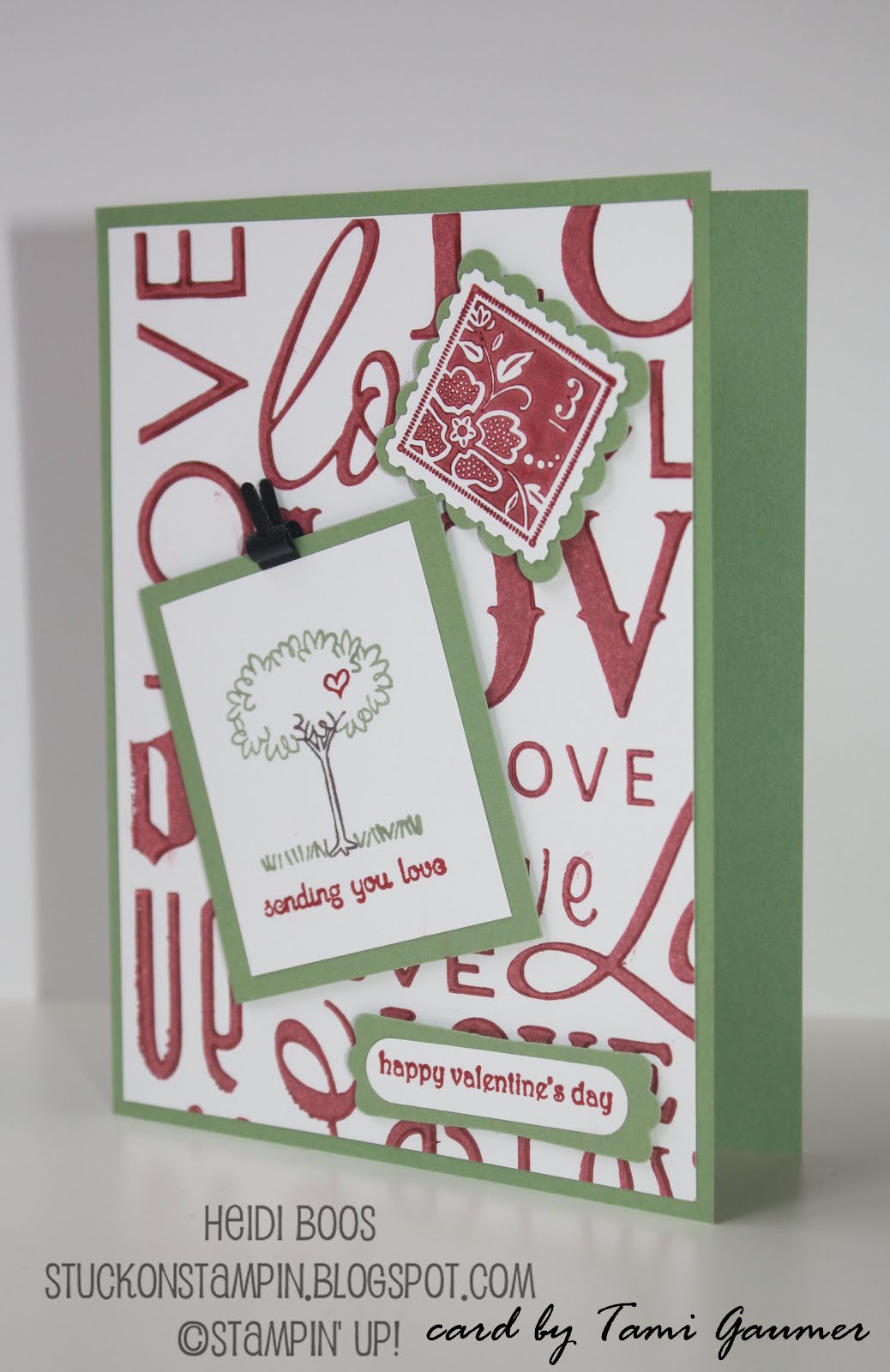
Card by Tami Gaumer
{Tami used the Love Letterpress Plate for the Big Shot for the background!}

Card by Terri Takashige
{Terri and I were thinking alike with using the Everyday Enchantment Sale-A-Bration DSP!}

Card by Laura Howell
{Laura's card highlighted a fun folding card and she used the shimmer paint on top of the Night of Navy ink...definitely shows up more in person!}

It was a great time with the girls and we probably could have kept chatting all night long!! So fun to be inspired and share ideas about our Stampin' Up! businesses...and to do it with such fun women is a real treat!

Monday, January 30, 2012

stamp club - January

I started up another round of Stamp Club on Friday night. 14 of us are going to be coming together once a month (Fourth Fridays) to stamp together! I'm really looking forward to it! There are two groups of six, myself, and one of my downline members. Our first meeting was last Friday and it was a blast!

I put together a couple of fun projects for the ladies...

Project #1 - "i love u" Shaker Card

We used the Shaker Frames that were introduced in the 2011 Holiday Mini Catalog. Although this catalog is now retired, the Shaker Frames are still available for purchase from the Mini Catalog CarryOver List. You get 6 of the nested circles below and as my gift to each of the ladies, I let them keep whatever we didn't use.

I kept the card fairly simple as I wanted the shaker frames to be our intended focus!


We made our own "confetti" using the leftover hearts after punching out with the Pinking Hearts Border punch, small hearts from the Owl punch (Pretty in Pink card stock and Red Glimmer Paper), and Silver Glass Glitter.


Stamp Set: Outlined Occasions (exclusive Sale-A-Bration set!! - spend $50 and get if for free!)
Paper: Window Sheets (to keep the confetti from falling out of the hole!), Pretty in Pink, Real Red, Subtles DSP Pack (Pretty in Pink polka dots), Red Glimmer Paper
Ink: Real Red
Accessories: 5/8" Real Red Grosgrain ribbon (retired), Silver Glass Glitter, Shaker Frames, Stampin' Dimensionals
Tools: 2-3/8" Scallop Circle punch, 1-3/4" Circle punch, 1-3/8" Circle punch, Pinking Hearts Border punch (to make tiny heart confetti), Owl punch (to make little heart confetti)


* * * * * * * * * * * * * * * * * * * * * * * * * * * *

Project #2 - Valentine's Pinwheel with a Licorice "Stick"

The second project I kept a little simple, but who doesn't love pinwheels?! You could use any kind of double-sided paper for these pinwheels. Each of my stamp club made them with the Real Red patterned paper from the Brights DSP pack. I also made some using retired paper from the 2010 Holiday Mini Catalog called Sending Love, but I didn't have enough to go around!

The quick and easy way to make pinwheels...
  • Cut any size square (mine is 5x 5, but cut them 4x4 and you can get 6 pinwheels out of one pieces of 12x12 DSP) then score the paper diagonally twice.
  • On each scored diagonal line, cut up to the center, stopping about 3/4-inch before the center.
  • Bring a corner to the center and secure with some adhesive and then continue all the way around, skipping a corner each time. Make sure to overlap once you get to the center.
  • For a secure hold (regular adhesive will not hold it together!), poke a brad through the center. I hid my brad with a heart in the center. The brad also pokes through the 1x8" Cellophane Bag that holds the piece of licorice. (FYI: The licorice stick is just slightly too long for the bag to have some room at the top for the brad, so using kitchen shears, I cut off the top of the licorice).


Stamp Set:
None
Paper: Brights DSP Pack, Red Glimmer Paper
Ink: None
Accessories: silver brads, 1x8" Cellophane Bags (still available on the Holiday Mini Catalog CarryOver List!)
Tools: 3/4" Circle punch, Heart to Heart punch (to make small heart in the center)

* * * * * * * * * * * * * * * * * * * * * * * * * * * *

Last year my hostesses each month received a little handmade gift from me, but this year I have decided that I would put together a little card kit pack of coordinating paper, buttons, ribbon, and misc. punched out sentiments. Just thought I would change it up a little! This month's pack included some Sending Love DSP (retired), Pretty in Pink card stock and ribbon, Very Vanilla card stock and ribbon, buttons, and brads. I also punched out some shapes from With All My Heart stamp set, which coordinates with the DSP.


Already looking forward to next months' club!

Saturday, January 28, 2012

you send me soaring


What fun to be chosen as last week's "Monkey Princess" at A La Card Monkey for creating THIS CARD. Those of us whose cards were featured were asked to be a guest designer for an upcoming sketch challenge. It has been awhile since I have had the time (or motivation) to participate, but I always love being able to have a chance to use a sketch to create a card. It definitely helps with "card maker's block".

This week's challenge is Love + Sketch #93 and the sketch looked like this...


I decided to ink up my new Send Me Soaring stamp set from the Occasions Mini Catalog and came up with this fun to create card...


{Heart Banner}

Stamp Set: Send Me Soaring (available in wood & clear mount)
Paper: Whisper White, Pink Pirouette, Baja Breeze, Melon Mambo, Cheerful Treat DSP (hostess exclusive)
Ink: Melon Mambo, Baja Breeze (clouds & inked edges), Early Espresso
Accessories: Sponges, Linen Thread, Stampin' Dimensionals,
Tools: 1" Circle punch, 1-1/4" Circle punch, Heart to Heart punch, Owl punch (for extra small heart with sentiment)


I'm also linking this Valentine's Day card to...


Spend some time in your stamp room and put together a Valentine's Day card and then head on over and link up with the rest of us! And, don't forget to go visit other stamper's awesome inspiration!

Tuesday, January 24, 2012

it's sale-a-bration time!!

Let's Sale-A-Brate!!

It's kind of like Christmas when it's...


Take advantage of Sale-A-Bration as...


Or step it up a notch and get even more free stuff when you host a workshop as...


{click on picture to view larger}

Have you been thinking about joining the Stampin' Up! family?! The Starter Kit is normally $175, so you're saving $50 AND getting a free pack of DSP (or digital downloads) for a year just for signing up before March 31st!! Contact me (heidilynneboos@hotmail.com) if you're on board to join!


{view Sale-A-Bration pamphlet}

Monday, January 23, 2012

anything goes challenge

I have been preparing for the start up of Stamp Club coming up on Friday, but I needed a little break and some inspiration for making my nephew's birthday card, so I headed to the A La Card Monkey Challenge #92 where "anything goes" this week.


I don't have very many boy stamp sets, so this card is about as boy-ish as I could get with what I could find in my stash and because my nephew is only turning six...I can still get away with "cutesy". I decided to play with the pinwheels again, but opted for cutting them out of the Big Top Birthday DSP instead of stamping.


I added some dimension with the "Happy Birthday" curled up a little. I probably could have added another pinwheel now that I see the extra white space, but the card is already in the hands of the six-year old, so I can't do anything about it now! :)


Stamp Set: On Your Birthday
Paper: Whisper White, Real Red, Tempting Turquoise, Daffodil Delight, Big Top Birthday DSP, Brights DSP Pack (Tempting Turquoise dots)
Ink: Real Red
Accessories: Tempting Turquoise brads, Real Red button, Stampin' Dimensionals
Tools: Big Shot, Scallop Square Duo Bigz Die

// ADDED BY RYAN ON 1-3-14 // END ADDED BY RYAN 1-4-14